How to change your Facebook page to Pirate speak for Talk Like a Pirate Day.
Oh how we love Talk Like a Pirate Day each year. And clearly the folks at Facebook too. If you want to change your whole Facebook page into Pirate-speak for the day (or you know, forever), so that a like becomes Arrr and events happen at…
September 19, 2014•2 min read
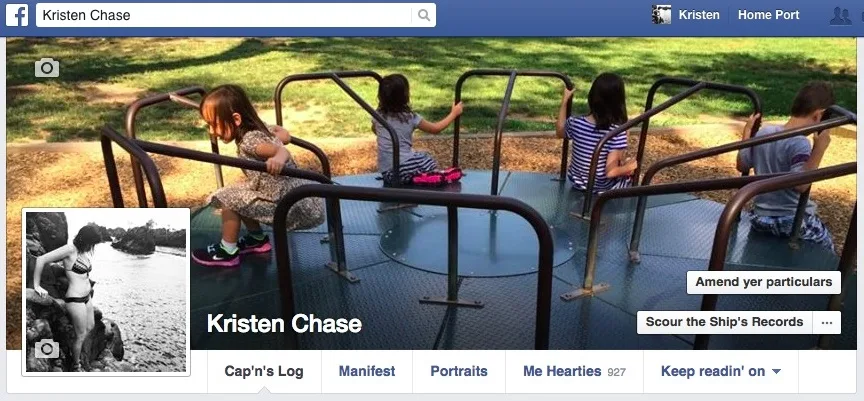
Oh how we love Talk Like a Pirate Day each year. And clearly the folks at Facebook too. If you want to change your whole Facebook page into Pirate-speak for the day (or you know, forever), so that a like becomes Arrr and events happen at Septembarr 20 roundabouts 11:00 in the evenin', it's easy.
At the very bottom of your page, in grey, is a link that refers to your language - like English (US). Click on that and you'll see a full list of other languages including English (Pirate). Click it.
That's it! Go back to the site, and you'll notice your posting field is now called Scrawlin', photos are Portraits/Bewitched Portraits (presumably the latter being the moving ones), and your friends are referred to as Me Hearties. Now you're ready to post your next update about what be troublin' ye.
Even more fun awaits if you manage a Facebook page. To change your photo you Adjust Your Main Sail. And then there's my favorite: What to do if you need to ban a spammer, like this one we found on our own Cool Mom Picks Facebook page today.
Of course if you're looking for "help" - just click Mayday at top right where settings might be and you're all set. Unless you're battling scurvy. Don't think Facebook can help with that one.
Happy Talk Like A Pirate Day!
Note: This is imported sample content. Original source.