Here's how to turn off the feature that's slowing down your iPhone
You might remember a few months ago when Apple announced that they are purposely slowing down your iPhones to prevent them from shutting down. This after we all thought we were going a little crazy when a new iPhone (and iOS) would launc…
You might remember a few months ago when Apple announced that they are purposely slowing down your iPhones to prevent them from shutting down. This after we all thought we were going a little crazy when a new iPhone (and iOS) would launch and our old phones would suddenly seem to slow down and lose battery charge.
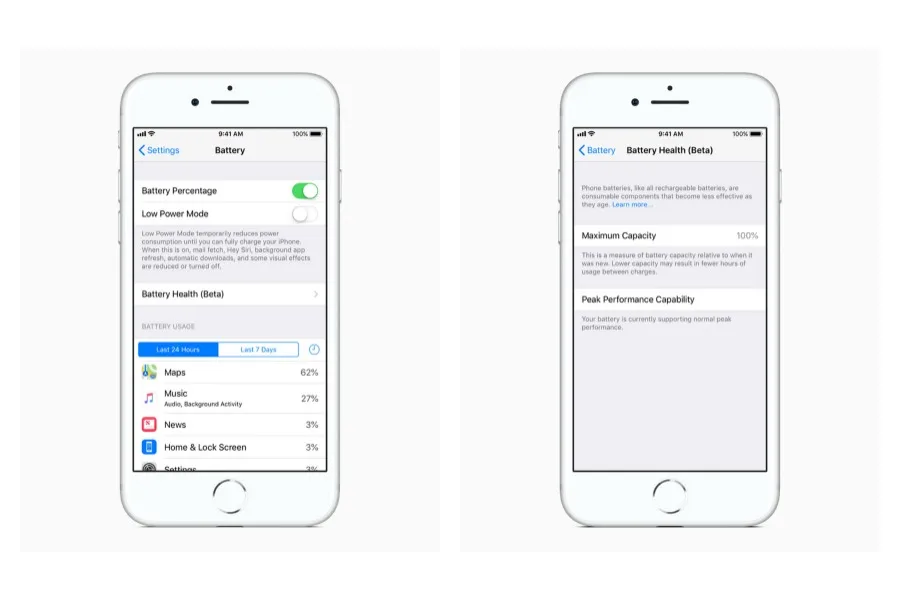
Well, with the latest iOS update (11.3 to be exact), they added a feature that allows you to check your battery health. Plus, you now have access to that power management feature they talked about back in December.
Once you've upgraded to iOS 11.3, just go to Settings > Battery to take a look. Both should be visible on iPhone 6 and later; those of you with iPhone 8, 8+, and X won't have the power management feature just yet.
And don't forget that if you have an iPhone 6 or later and feel as though the battery has gone kaput, you can head to the Apple store to get a new one for a deeply discounted price through the end of the year.
For busy parents, our smartphones have become our lifelines, whether it's the calendar that helps keep families on track to the emails, social media, and various apps that keep us connected personally and professionally. That's why it's …
If you want to know how to check your voter registration, we're glad you asked! Because you might have heard there's a pretty big election coming up, not just for President, but for 33 US Senate seats, all 435 seats in the House of Repre…
In April 2024, the total solar eclipse will hit our sky, and let's just say we're all pretty excited. If you've got the date marked on your calendar (or wondering if you should), check out these tips for watching the solar eclipse from o…
 Tips and Tricks
 Causes and Giving Back
 Tips and Tricks