Tech trick: How to hide app purchases so your kids can't download through Family Sharing.
I'm grateful to my daughter who (much to the chagrin of tweens and teens everywhere, I'm sure) tipped me off to a trick I wasn't aware of: Kids can easily download new apps to their devices without your knowledge, if you have Apple Famil…
June 19, 2017•3 min read
I'm grateful to my daughter who (much to the chagrin of tweens and teens everywhere, I'm sure) tipped me off to a trick I wasn't aware of: Kids can easily download new apps to their devices without your knowledge, if you have Apple Family Sharing in use.
Now my kids do need my approval to download any new apps, because of the Ask to Buy feature I have enabled. And I love Apple Family Sharing, because it means I'm not paying three times when we all want to play Alto's Adventure.
(Don't judge.)
Related: A new study about kids’ online behavior might surprise you. Not in a good way.
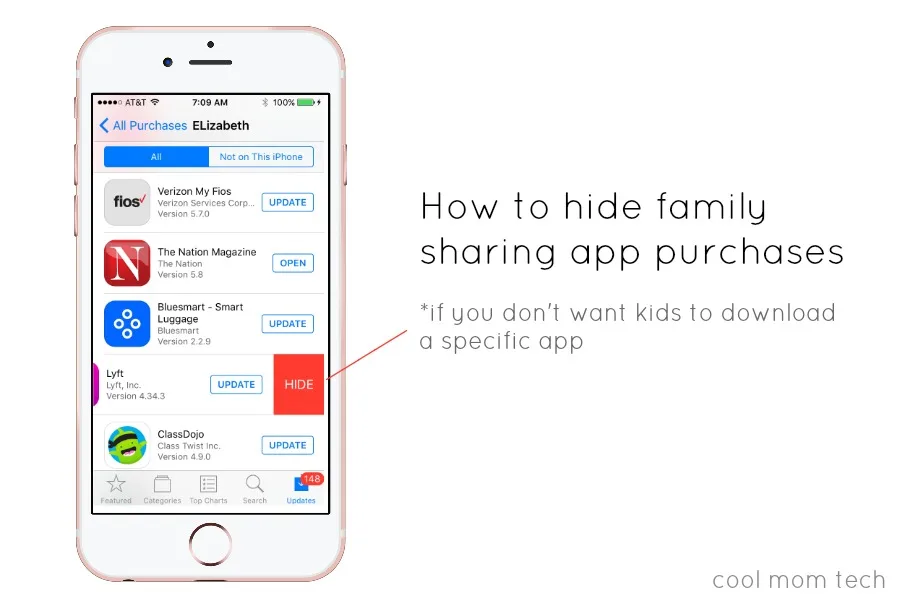
What I didn't know is that they can search for an app like say, Instagram or Facebook -- something you may have said not to but happen to use yourself on your own device -- and then just download it. I already knew I could restrict my songs and book purchases, but for some reason I didn't know I had to restrict app downloads as well; I just assumed that I had the ability to approve all new downloads -- not just new purchases. And I was wrong. Fortunately, it's not hard to mark some apps as private and hide them, so they won't be accessible through family sharing.How to hide app purchases from Family Sharing
- Go to the App Store app
- At the very top you'll see "Purchases." Click the > icon to the right
- Click on "My Purchases" at the top, which reveals a list of all your apps, including those not currently on your device
- Swipe left next to any app you want to hide to reveal the HIDE button. Click..and done.
Related: 10 questions parents should ask when writing a cell phone contract for your kids
Of course, my standard disclaimer applies here: no parental restrictions are ever a substitute for having the tech talk with your kids early and often, keeping an eye on their social media use, and giving them the chance to slowly gain your trust so they can make their own good decisions and earn more responsibility and freedom with technology. And hey, thanks for my daughter for this one. Extra dessert for her tonight. Maybe through Seamless. Which no, is not on her phone. Yet.Filed Under:child safetyinternet safetyiOS appsiPhone and Apple newstips and trickstweens + big kids
Note: This is imported sample content. Original source.


