The one Instagram feature you might not be using, but totally should.
Instagram is one of my favorite places for all sorts of inspiration, whether it's a pair of shoes I'm coveting, or a great recipe from Cool Mom Eats I want to try in my own kitchen. But if you're like me, you snap a screen shot and then …
March 28, 2017•1 min read
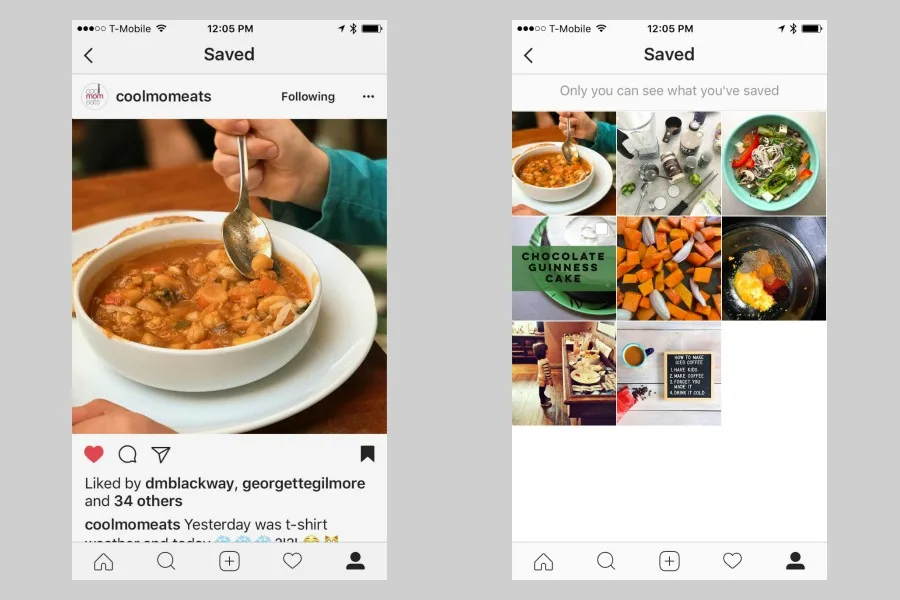
Instagram is one of my favorite places for all sorts of inspiration, whether it's a pair of shoes I'm coveting, or a great recipe from Cool Mom Eats I want to try in my own kitchen. But if you're like me, you snap a screen shot and then end up with a bajillion photos in your phone library. That's why you need to start using the Saved Posts feature on Instagram they rolled out awhile ago, immediately.
Related: 15 Instagram tips everyone should know
Here's how Saved Posts on Instagram works
1. Simply tap the little bookmark icon on an Instagram photo you'd like to come back to. 2. Then when you're on your main profile page, hit that same icon. 3. You'll be taken to your private Saved page, where only you can see all the posts you've saved. That's it! What I've also found is that Saved Photos is actually a huge timesaver. So, if you're just doing a quick flip through your Instagram feed and you see a few photos that you want to comment on or respond to later, this feature is perfect for that.Related: A comparison of the top 3 regram apps
Make sure you're following us on Instagram (and while you're at it, Cool Mom Eats, too)!Note: This is imported sample content. Original source.


