Preserve old photographs (yes, real ones) with Google's new PhotoScan app
As much as I love my iPhone camera roll and the thousands of photos it houses, I do have a very soft spot for old photographs. The ones where the color is a little faded, the edges are a little worn and the memories come flooding back. T…
By Jeana Tahnk
December 10, 2016•2 min read
As much as I love my iPhone camera roll and the thousands of photos it houses, I do have a very soft spot for old photographs. The ones where the color is a little faded, the edges are a little worn and the memories come flooding back. Thanks to a new Google app called PhotoScan, there's a super easy way to combine old with the new to get the best of both worlds, just in time for holiday gift giving.
Related: The quickest and easiest way to share iPhone photos and videos
Related: 21 tasteful ideas for showcasing your favorite photos beyond framing them
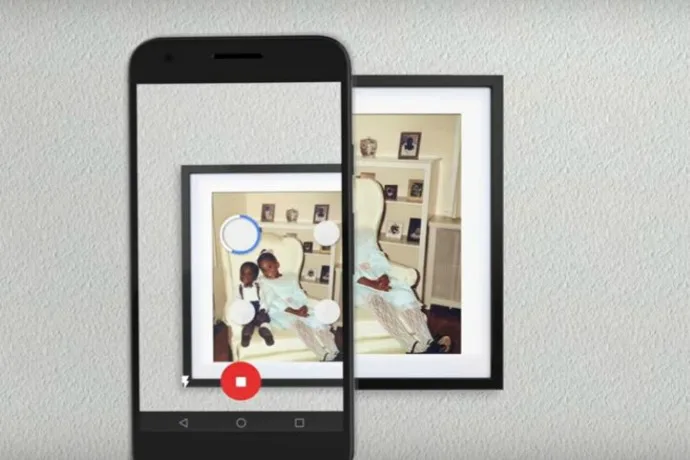
PhotoScan (iOS and Android) is a fantastic way to quickly convert those old boxes of photos (you know, the ones sitting in your basement) into digital images to enjoy on your smartphones and tablets. Simply align the photo, match up the four white corners of the photos as the screen indicates and snap. That's it! You have the original photo, now in digital form, enhanced and without glare to show off your teased hair and taffeta prom dress in their full glory.
Sure, you can still scan your photos one-by-one, but if you've got a bunch of them -- in boxes or albums -- PhotoScan makes it so much quicker and easier to turn them into digital masterpieces. And then make cool holiday photo gifts. Or just embarrass people on Facebook. Ha.
PhotoScan is available for free for iOS and Android devices.
Note: This is imported sample content. Original source.