Finally use public Wi-Fi hotspots safely, thanks to Private WiFi. (That's not a contradiction, promise.)
Having worked with a security company for years on the PR side, I'm super vigilant about what information I put out there, and more importantly, what networks I use to access information. (Those cybercriminals are more sophisticated than…
By Jeana Tahnk
January 24, 2013•2 min read
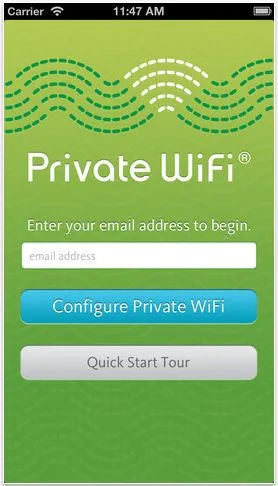
Having worked with a security company for years on the PR side, I'm super vigilant about what information I put out there, and more importantly, what networks I use to access information. (Those cybercriminals are more sophisticated than you can ever imagine.) I never do any kind of online banking or shopping from an unsecure WiFi network, but with the new Private WiFi app for iOS, I finally have the option to do so.
This one is a game changer. Private WiFi is a simple app that automatically gives you bank-security encryption on all public hotspots and WiFi networks. Genius! The app utilizes whichever public WiFi network you're on, but automatically turns it into a VPN (virtual private network), rerouting your data through a secure server that is hosted by the app company.
In layman's terms, any passwords, pictures, credit card numbers, bank account information, or anything that a hacker would be interested in, is now off limits.
Setting up the app is a multi-step process, but quick. Once you download the free app, you'll need to configure the program onto your phone by following the step-by-step directions. When you're ready to do a little shopping or money transferring, you simply turn the VPN option on in Settings.
You know it's on because you'll see a little VPN icon running at the top of your phone.
The app is free for up to 500MB of data, but after that, it costs $1.99 for 1GB and $7.99 for 10GB of data usage. Depending on how much you're using those Starbucks or airport networks, the 500MB free option should be sufficient for light browsing and communicating while you're sipping your coffee. But as far as I'm concerned, safe data is a bargain at pretty much any price. Trust me, I know too much. -Jeana
Private WiFi is available as a free download from iTunes. An Android version is in the works.
This one is a game changer. Private WiFi is a simple app that automatically gives you bank-security encryption on all public hotspots and WiFi networks. Genius! The app utilizes whichever public WiFi network you're on, but automatically turns it into a VPN (virtual private network), rerouting your data through a secure server that is hosted by the app company.
In layman's terms, any passwords, pictures, credit card numbers, bank account information, or anything that a hacker would be interested in, is now off limits.
Setting up the app is a multi-step process, but quick. Once you download the free app, you'll need to configure the program onto your phone by following the step-by-step directions. When you're ready to do a little shopping or money transferring, you simply turn the VPN option on in Settings.
You know it's on because you'll see a little VPN icon running at the top of your phone.
The app is free for up to 500MB of data, but after that, it costs $1.99 for 1GB and $7.99 for 10GB of data usage. Depending on how much you're using those Starbucks or airport networks, the 500MB free option should be sufficient for light browsing and communicating while you're sipping your coffee. But as far as I'm concerned, safe data is a bargain at pretty much any price. Trust me, I know too much. -Jeana
Private WiFi is available as a free download from iTunes. An Android version is in the works.
Filed Under:Helpful Servicesinternetinternet safetyiOS appsiPhone and Apple newsonline privacysecurityWiFi
Note: This is imported sample content. Original source.