One of the coolest, easiest, free photo editing apps we've found
Just like you, we rely on trusted sources to pass along tips for great apps. So when a strong reco came in to try out Pixlr-o-matic , we had to check it out. Yes, we know, there are tons of photo editing apps already out there for both A…
By Jeana Tahnk
September 15, 2012•2 min read
Just like you, we rely on trusted sources to pass along tips for great apps. So when a strong reco came in to try out Pixlr-o-matic, we had to check it out.
Yes, we know, there are tons of photo editing apps already out there for both Android and iOS, but it turns out this is one of the easiest-to-use and quickest we've come across. In other words, we love it. Here's why: Photo editing aside, I love that I don't have to create an account, sign up for anything or go through the rigamarole of registering at all. Simply download the app, pick a picture and start editing, filtering, brightening or adding neon to your heart's content.
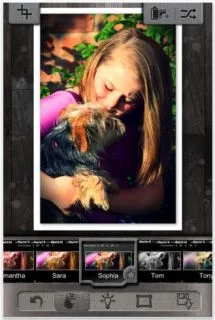
That's just a tiny preview of the kinds of filtering options on the app. You can do vintage, retro, modern, you name it. And as a fun little extra, instead of film names like "XPro" most of them are named for people, so if someone really likes one of your photos, you can respond with a nonchalant, "Thanks, I used a 'Karen.'"
You can immediately share your Karen-ed, Julia-ed, Dean-ed photo with your social networks or via email. There's also a Pixlr-o-matic PLUS version (via in-app purchase) if you need even more photo effects--but the free version is pretty awesome as is. -Jeana
Pixlr-o-matic is available for free from iTunes and Google Play.
Thanks Isabel of Alpha Mom for the great tip.
Yes, we know, there are tons of photo editing apps already out there for both Android and iOS, but it turns out this is one of the easiest-to-use and quickest we've come across. In other words, we love it. Here's why: Photo editing aside, I love that I don't have to create an account, sign up for anything or go through the rigamarole of registering at all. Simply download the app, pick a picture and start editing, filtering, brightening or adding neon to your heart's content.
That's just a tiny preview of the kinds of filtering options on the app. You can do vintage, retro, modern, you name it. And as a fun little extra, instead of film names like "XPro" most of them are named for people, so if someone really likes one of your photos, you can respond with a nonchalant, "Thanks, I used a 'Karen.'"
You can immediately share your Karen-ed, Julia-ed, Dean-ed photo with your social networks or via email. There's also a Pixlr-o-matic PLUS version (via in-app purchase) if you need even more photo effects--but the free version is pretty awesome as is. -Jeana
Pixlr-o-matic is available for free from iTunes and Google Play.
Thanks Isabel of Alpha Mom for the great tip.
Note: This is imported sample content. Original source.