A Mac photo app that works magic on your photos
You just captured the perfect seaside photo of your two adorable kids playing in the waves only to realize that right when you clicked the shutter, two beach-goers wandered into the frame of your quintessential moment. Your husband snapp…
By Molly
May 22, 2012•2 min read
You just captured the perfect seaside photo of your two adorable kids playing in the waves only to realize that right when you clicked the shutter, two beach-goers wandered into the frame of your quintessential moment.
Your husband snapped a great portrait of you and your kids. Well, perfect except for that ugly, hormonal blemish on your chin.
Photos ruined? Not any more. This smart and simple app for Mac, Snapheal, works magic on all your photographs--from erasing the photo bombers in your pictures to stamping out unwanted marks and spots, and all the other great tools you want in a photo editing program.
There are a lot of apps and programs out there that help with photo editing, so it's hard to find one that really stands apart from the pack. But if you want more control than PicMonkey and don't want to splurge for Lightroom, then this app might be just the middleman you're looking for.
When you open up Snapheal you'll find an easy uploading screen that allows you to drag and drop or open up your specific photo file. From there you'll launch all the editing tools you need to tweak and perfect your picture.
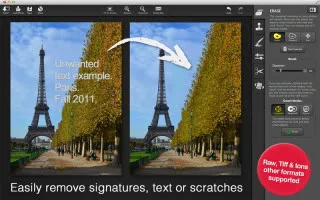
The Erase tool allows you to paint over an object in your photo and magically and seamlessly remove it from your picture, while "healing" all the elements in your background so you'd never know it was there. It's kind of amazing.
The Clone and Stamp tool allows you to take one part of your picture and paint it over another--think erasing smudge marks off the wall behind your kid, or covering up an annoying shadow across your cheek. Then there are retouching tools let you control things like saturation, temperature, contrast and lighting. There's even a great blurring tool. When you're done, save the photos back onto your Mac, or share via social networks.
What else is great about this app? There's a short video tutorial for each of the editing elements in case you need a little help before jumping in--and a simple undo button which comes in really handy. Trust me. -Molly
Snapheal is available from the Mac app store for $14.99
Your husband snapped a great portrait of you and your kids. Well, perfect except for that ugly, hormonal blemish on your chin.
Photos ruined? Not any more. This smart and simple app for Mac, Snapheal, works magic on all your photographs--from erasing the photo bombers in your pictures to stamping out unwanted marks and spots, and all the other great tools you want in a photo editing program.
There are a lot of apps and programs out there that help with photo editing, so it's hard to find one that really stands apart from the pack. But if you want more control than PicMonkey and don't want to splurge for Lightroom, then this app might be just the middleman you're looking for.
When you open up Snapheal you'll find an easy uploading screen that allows you to drag and drop or open up your specific photo file. From there you'll launch all the editing tools you need to tweak and perfect your picture.
The Erase tool allows you to paint over an object in your photo and magically and seamlessly remove it from your picture, while "healing" all the elements in your background so you'd never know it was there. It's kind of amazing.
The Clone and Stamp tool allows you to take one part of your picture and paint it over another--think erasing smudge marks off the wall behind your kid, or covering up an annoying shadow across your cheek. Then there are retouching tools let you control things like saturation, temperature, contrast and lighting. There's even a great blurring tool. When you're done, save the photos back onto your Mac, or share via social networks.
What else is great about this app? There's a short video tutorial for each of the editing elements in case you need a little help before jumping in--and a simple undo button which comes in really handy. Trust me. -Molly
Snapheal is available from the Mac app store for $14.99
Note: This is imported sample content. Original source.