How do you scan images to your iPad? iConvert
Just when I thought my iPad couldn't get more useful, I discovered this handy new gadget that lets you scan photos, receipts, even your kids' artwork right to your iPad. Genius! The handy, compact iConvert Scanner allows you to save phot…
March 23, 2012•1 min read
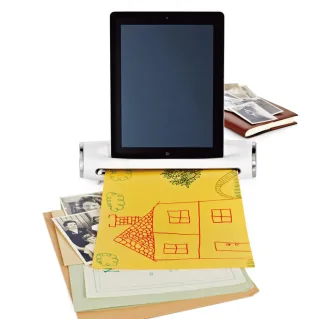
Just when I thought my iPad couldn't get more useful, I discovered this handy new gadget that lets you scan photos, receipts, even your kids' artwork right to your iPad. Genius!
The handy, compact iConvert Scanner allows you to save photos and documents as JPEGS on your iPad or iPad 2. Simply download the free app, attach your iPad to the scanner, and then load up your pics, art, and docs to your heart's content.
I've seen the scanned result of a slew of old photos and I was super impressed with the quality and detail. And even better, you won't lose desk space with the iConvert; it's small enough that you could carry it around with you.
The gadget doesn't come cheap, but if you're a consummate tablet user and you want to get your files to the cloud as quickly and easily as possible, this is a terrific way to go. -Kristen
You can purchase the iConvert Scanner at Brookstone.
{h/t Ciaran Blumenfeld}
The handy, compact iConvert Scanner allows you to save photos and documents as JPEGS on your iPad or iPad 2. Simply download the free app, attach your iPad to the scanner, and then load up your pics, art, and docs to your heart's content.
I've seen the scanned result of a slew of old photos and I was super impressed with the quality and detail. And even better, you won't lose desk space with the iConvert; it's small enough that you could carry it around with you.
The gadget doesn't come cheap, but if you're a consummate tablet user and you want to get your files to the cloud as quickly and easily as possible, this is a terrific way to go. -Kristen
You can purchase the iConvert Scanner at Brookstone.
{h/t Ciaran Blumenfeld}
Note: This is imported sample content. Original source.