What's a good family desktop computer? Reader Q+A
What would be your pick for a family desktop computer? We have 7 & 5 year old boys and my husband is wanting to look at some of the touch screen desktops. Thanks for any opinions! -Heather We definitely like the idea of a touch screen de…
December 20, 2011•2 min read
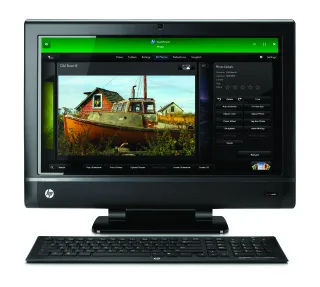
What would be your pick for a family desktop computer? We have 7 & 5 year old boys and my husband is wanting to look at some of the touch screen desktops. Thanks for any opinions! -Heather
We definitely like the idea of a touch screen desktop, Heather, especially since so many kids are already used to it thanks to the proliferation of tablets and smart phones that have the same. Aside from the HP TouchSmart that we featured on our site and recommend you consider, here are three other options. Just make sure to get a big hard drive if you plan on saving your family photos and videos on your desktop as opposed to the Cloud.
1.Dell Inspiron One
The Dell Inspiron One is an All-in-One computer, which means no tower, something that is super appealing to us since you can put it in a more central location without taking up a ton of space. This model has a 23 inch HD Display and webcam, as well as an option touch screen, which means you can turn it off and use the regular keyboard and mouse combo. And at just under $600, it's the lowest priced All-in-One desktop on the market.
2. Sony VAIO L Series
On the other end of the cost spectrum is the Sony VAIO L Series All-in-One, which has everything that you'll get with the Dell as well as HDMI, TV Tuner, Blu Ray disc and Dolby surround sound. Essentially, it would double as an HDTV and Blu Ray player, possibly knocking a couple of pricey gadgets off your list.
3. Mix & Match Tower and Monitor
While it's a little tough to find a touch screen monitor, there are some great high resolution monitors from HP and Dell (just to name two of many) that you could combine with a tower of your choice (based on the specs that are most important to you). Then you won't be limited by what you're getting in a pre-made package. If you're definitely set on a touch screen, this might not be the best option, but worth considering if you're flexible on what kind of monitor you think you'll need.
Got a tech question we can help you with? Just drop us an email at info@coolmomtech.com and we'll see what we can do.
We definitely like the idea of a touch screen desktop, Heather, especially since so many kids are already used to it thanks to the proliferation of tablets and smart phones that have the same. Aside from the HP TouchSmart that we featured on our site and recommend you consider, here are three other options. Just make sure to get a big hard drive if you plan on saving your family photos and videos on your desktop as opposed to the Cloud.
1.Dell Inspiron One
The Dell Inspiron One is an All-in-One computer, which means no tower, something that is super appealing to us since you can put it in a more central location without taking up a ton of space. This model has a 23 inch HD Display and webcam, as well as an option touch screen, which means you can turn it off and use the regular keyboard and mouse combo. And at just under $600, it's the lowest priced All-in-One desktop on the market.
2. Sony VAIO L Series
On the other end of the cost spectrum is the Sony VAIO L Series All-in-One, which has everything that you'll get with the Dell as well as HDMI, TV Tuner, Blu Ray disc and Dolby surround sound. Essentially, it would double as an HDTV and Blu Ray player, possibly knocking a couple of pricey gadgets off your list.
3. Mix & Match Tower and Monitor
While it's a little tough to find a touch screen monitor, there are some great high resolution monitors from HP and Dell (just to name two of many) that you could combine with a tower of your choice (based on the specs that are most important to you). Then you won't be limited by what you're getting in a pre-made package. If you're definitely set on a touch screen, this might not be the best option, but worth considering if you're flexible on what kind of monitor you think you'll need.
Got a tech question we can help you with? Just drop us an email at info@coolmomtech.com and we'll see what we can do.
Note: This is imported sample content. Original source.